Type Your Name and Watch It Become 15,000 Particles
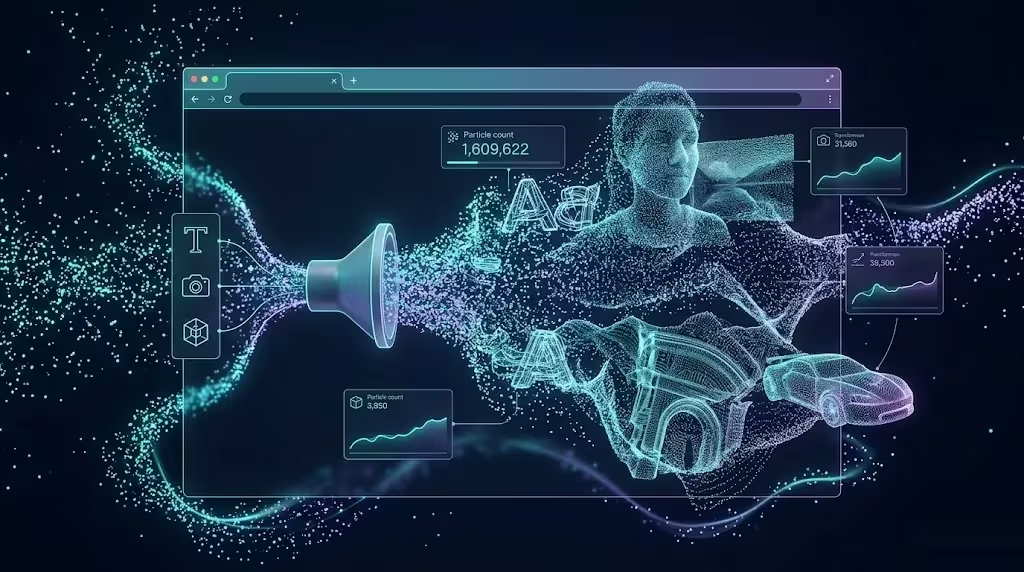
Picture typing your name and watching it explode into fifteen thousand points of light that float, spin, and reorganize in space. No software to install. No design program to open. Just your browser and a graphics card doing the heavy lifting.
That’s exactly what the 3D Particle Simulator on my portfolio does: it takes anything — text, a photo, live video, even a 3D model — and breaks it down into thousands of luminous particles that you can reshape using twelve mathematical formations and eight visual styles. All in real time, all inside the browser tab you have open right now.
In this article I’ll walk through what it does, the ways you can play with it, and — for the curious — how it works under the hood without burying you in jargon.
What Exactly Is It?
Think of it as a jigsaw puzzle in reverse. Instead of assembling pieces into a picture, the simulator does the opposite: it scatters the source into particles, then reorganizes them into whatever shape you choose. A perfect sphere, a spiral galaxy, a DNA double helix, a heart.
Under the hood it’s a 3D scene built with Three.js (the standard library for 3D graphics in the browser) running on top of WebGL — which means running on top of your GPU. That’s what makes it possible to move fifteen thousand objects at sixty frames per second without the browser choking.
The current version ships with twelve mathematical formations, gravity wells that push particles around as you move your mouse over them, and five distinct ways to “feed” the simulator your own content.
The 12 Formations
Each formation isn’t a pre-baked shape — it’s a mathematical formula that decides where every one of the fifteen thousand particles ends up.
- Sphere — Fibonacci distribution, the same pattern sunflower seeds follow to pack themselves without gaps.
- Cube, Helix, Torus and Saturn’s Rings — classic geometry brought into 3D.
- Galaxy — logarithmic spiral arms, the same shape real galaxies form.
- DNA — the double helix, two ribbons of particles woven together.
- Heart — the parametric heart curve, tailor-made for a Valentine’s campaign.
- Lorenz — the Lorenz attractor, one of the most famous shapes in chaos theory: it never repeats and never closes on itself.
- Waves, Tornado and Fireworks — procedural motion for launches, intros and high-energy content.
For a business, this isn’t just eye candy: the heart for February, fireworks for a product launch, the galaxy for tech content, the DNA helix for a biotech pitch deck. One tool, dozens of visual assets ready to go, and none of them require opening After Effects or hiring a motion designer for a one-off social post.
What makes the formations interesting from an engineering standpoint is that none of them are stored as pre-computed point clouds. Every formation is a function f(index, time) → Vector3 evaluated fresh for all fifteen thousand particles on every frame. That’s a deliberate trade-off: it costs more CPU per frame than reading from a lookup table, but it means the galaxy can keep rotating, the Lorenz attractor can keep evolving, and the heart can keep pulsing — motion is baked into the math itself, not bolted on afterward as a separate animation layer.
The 5 Ways to Create Particles
Here’s the fun part: the simulator isn’t limited to its built-in formations. You can feed it your own content and it converts it into particles on the fly.
Text to Particles
You type a word and it appears made of particles. The trick is simple to explain: the text is “drawn” onto an invisible canvas, its pixels are read, and each pixel becomes a 3D particle placed in space.
Image to Particles
You upload a photo and every particle takes on the actual pixel color it represents. The result is your image reconstructed as a cloud of points that stay true to the original colors.
Real-Time Video
The most striking mode: you load a video and the particles update on every single frame. It’s like watching a pixelated movie in three dimensions, moving live. Under the hood this means re-sampling the canvas, re-reading pixel data, and re-computing fifteen thousand positions thirty or sixty times a second — the same pipeline as the static-image mode, just running in a continuous loop instead of once. Getting this to hold a steady frame rate without stutter was the single hardest performance problem in the whole build, because every other mode can afford to do its heavy sampling work once and then just animate the result; video mode has to redo the expensive part constantly.
3D Models
You can upload a real .glb model — a part, a character, a 3D logo — and the simulator turns it into a cloud of luminous points that preserves its volume. Instead of sampling a flat 2D canvas, this mode samples the model’s surface geometry directly, distributing particles across triangles weighted by area, so a large flat panel of the model gets proportionally more particles than a tiny detail — the point cloud reads as the model’s actual shape rather than a random scatter that happens to occupy the same bounding box.
Draw Pad
And if you’d rather not upload anything at all, you draw. With your mouse or your finger you sketch whatever comes to mind and it turns into particles instantly.
The 8 Visual Styles
The same formation can look radically different across eight styles: Spark (bright glow), Plasma (glowing ring), Ink (ink-like), Paint (artistic brushstroke), Steel (metallic), Glass (translucent), Vector (directional arrows) and Cyber (futuristic wireframe).
Each style is really a small program called a shader, running directly on your graphics card, deciding how every single particle gets painted — its color, its glow, its shape. That’s why switching styles is instant even with fifteen thousand particles on screen at once.
Blueprint Mode and Draw Pad: Outlines Only
Blueprint mode detects the edges of an image with an edge-detection algorithm (Sobel) — the same way a technical blueprint shows only the lines — and turns only those outlines into particles. The effect reads like a hologram, or an engineering schematic floating in the air.
Combine it with the Draw Pad and you can go from a freehand sketch to the precise outline of a photograph, all rendered as particles.
How It Works Under the Hood (for the Curious)
Without drowning you in technicalities, here are the four ingredients that make it possible:
- InstancedMesh — the trick that lets the GPU draw fifteen thousand particles as if they were a single object. Without it, the browser would have to issue fifteen thousand draw calls per frame and would grind to a halt.
- GLSL shaders — the mini-programs that decide how each particle looks. These are what bring the eight styles to life.
- Smooth morphing (lerp) — when you switch formations, particles don’t “snap” into their new position: they glide there, interpolating position frame by frame. That fluid transition is what makes it feel organic instead of mechanical.
- Bloom — the light-glow post-processing effect that makes the points shine and diffuse like something out of a sci-fi film.
The full pipeline is: your content → read onto a 2D canvas → sampled into points → positions computed in 3D → the GPU renders it. And that cycle repeats sixty times per second.
One detail that took real trial and error to get right: sampling density. Reading every single pixel from a 512×512 canvas would give you 262,144 candidate points, far more than the particle budget allows. The sampler instead walks the canvas in a grid with a configurable stride, skips fully transparent or background-colored pixels, and biases denser sampling toward areas with high contrast — edges, in other words — so a face or a logo keeps its recognizable silhouette even when it’s reconstructed from only fifteen thousand points instead of a quarter million.
Performance: Built for Mobile Too
On a desktop machine, the simulator moves 15,000 particles with bloom at 60 fps. On mobile, it detects the device and adapts automatically: it drops to 8,000 particles, simplifies the heaviest effects, and adjusts controls for touch. The philosophy is that it should just work well anywhere, without you having to touch a single setting.
All of this runs on your GPU, locally. There’s no server crunching anything behind the scenes — everything you see is computed on your own device, in your own browser tab.
That local-only architecture wasn’t just a performance decision, it was also a privacy one: when you upload a photo, a video frame, or a 3D model to feed the simulator, none of it ever leaves your machine. There’s no upload endpoint, no processing server, no stored file anywhere. The browser reads the file, samples it, and discards it the moment you close the tab or load something else. For a demo that specifically invites people to upload their own face or a home video, that guarantee mattered as much as the frame rate did.
Why I Built It This Way
I could have shipped this as a much simpler gadget: a handful of pre-baked formations and a play button. Instead I leaned into letting visitors bring their own content, because a static demo proves nothing about how the code actually works — anyone can render a nice-looking galaxy once and call it done. Watching your own name, your own face, or your own home video get sampled into particles in real time proves the pipeline is real, not a canned animation dressed up to look interactive. That distinction matters a lot when the whole point of a portfolio gadget is to demonstrate engineering ability rather than just aesthetic taste.
Try It Yourself
The best way to understand it is to play with it. Head to the AI Gadgets section of the portfolio, open the Particle Simulator, and try:
- Typing your name and watching it form out of particles.
- Uploading your profile photo and reconstructing it in real colors.
- Cycling through all eight styles on the same formation to see how completely different it looks each time.
Open the 3D Particle Simulator
Credits and Context
The simulator was inspired by the work at particles.casberry.in and built from scratch for this portfolio with Three.js r128, vanilla JavaScript, no frameworks and no npm — the same philosophy that runs through the rest of the site: no unnecessary dependencies, everything in plain sight, everything under control.
At its core, it’s a demonstration of something simple: the modern browser is capable of far more than it looks like from the outside. And sometimes the best way to prove it is to type your name and watch it turn into fifteen thousand stars.
Building something similar?
I build AI integrations, SEO systems and 3D/web experiments for companies. Based in Spain, working remotely with teams anywhere.
Get in touch →All articles in English → · Prefer Spanish? Read the original article in Spanish →