Why Build a Solar System
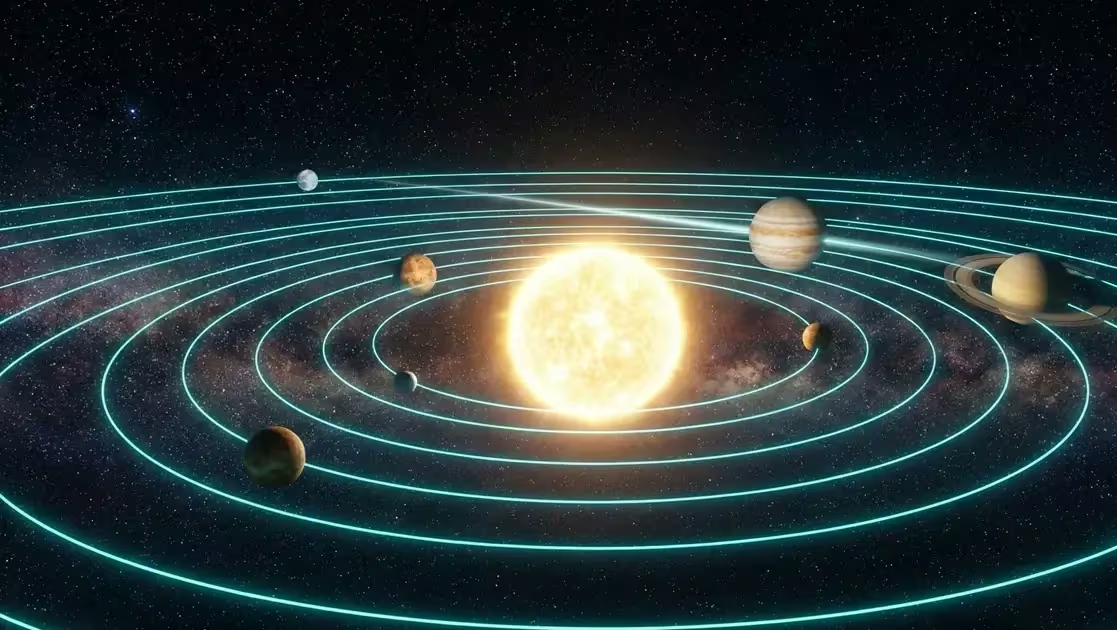
When I decided my portfolio needed interactive gadgets that went beyond another CRUD demo, I wanted something that combined visible technical complexity with immediate wow factor. An astronomical simulator delivers both: the visitor sees planets orbiting in real 3D and can interact with them, while underneath runs real orbital mechanics, custom shaders, and a genuinely complex state-management system.
The result: 8,087 lines of plain JavaScript in a single file (solar-system-pro.js), no bundler, no React, no TypeScript. Just Three.js r128, the Launch Library 2 API, and a lot of trigonometry.
I’m not writing this as a tutorial on how to bolt Three.js onto a page. I’m writing it because building a system this size, entirely in vanilla JS, forced me to confront problems that frameworks usually hide from you — state management without a store, performance budgets without a profiler baked into your build tool, and the discipline of keeping an 8,000-line file navigable without the crutch of automatic code-splitting.
General Architecture
The file is organized into clear functional blocks. I didn’t plan this structure from day one — it emerged as the project grew, and I refactored into it once the file passed 3,000 lines and navigating it started to hurt.
| Block | Lines | Function |
|---|---|---|
| NASA data | ~800 | Orbital constants for planets, moons and NEOs |
| Scene setup | ~400 | Renderer, camera, lights, post-processing |
| Planet factory | ~600 | Procedural generation of textures and geometries |
| Moon system | ~500 | 95+ moons with independent orbits |
| Orbit engine | ~700 | Kepler mechanics + temporal interpolation |
| UI / controls | ~900 | Control panel, sliders, keyboard shortcuts |
| Interstellar mode | ~400 | Skybox, 200K stars, nebulae |
| Missions & NEOs | ~350 | Voyager, Cassini and other mission trajectories |
| Info panels | ~500 | HUD with data for each celestial body |
| Constellations | ~300 | 88 constellations with lines and labels |
Ten blocks, each with a single responsibility, is what keeps a monolithic file like this maintainable. It’s the closest thing to modularity you can get without an actual module system — and honestly, with <script> tags and no bundler, that’s the constraint I was working within.
Kepler Orbital Mechanics
The heart of the simulator is a real implementation of Kepler’s laws. Every planet carries real NASA orbital data: semi-major axis, eccentricity, inclination, longitude of the ascending node, argument of periapsis, and mean anomaly at epoch J2000.
The Kepler Equation
The fundamental problem is converting time into position. Kepler solves it with the eccentric anomaly (E), computed iteratively:
// Solve Kepler's equation: M = E - e·sin(E)
function solveKepler(M, e, tolerance = 1e-8) {
    let E = M; // Initial guess
    for (let i = 0; i < 50; i++) {
        const dE = (E - e * Math.sin(E) - M) / (1 - e * Math.cos(E));
        E -= dE;
        if (Math.abs(dE) < tolerance) break;
    }
    return E;
}

// From eccentric anomaly to 3D coordinates
function keplerToCartesian(a, e, i, omega, Omega, E) {
    const cosE = Math.cos(E), sinE = Math.sin(E);
    const r = a * (1 - e * cosE); // Distance to the Sun
    const v = Math.atan2(
        Math.sqrt(1 - e*e) * sinE,
        cosE - e
    ); // True anomaly

    // Rotate into the ecliptic plane
    const cosV = Math.cos(v + omega);
    const sinV = Math.sin(v + omega);
    const cosO = Math.cos(Omega);
    const sinO = Math.sin(Omega);
    const cosI = Math.cos(i);
    const sinI = Math.sin(i);

    return new THREE.Vector3(
        r * (cosO * cosV - sinO * sinV * cosI),
        r * sinV * sinI,
        r * (sinO * cosV + cosO * sinV * cosI)
    );
}
This Newton-Raphson method converges in 3-5 iterations for planetary orbits. For comets with high eccentricity (e > 0.9), it needs more iterations to converge — but it works, and it works fast enough to run for every body in the scene, every frame, without a noticeable cost.
Time Control
The user can speed up time from 1x (real time) up to 1,000,000x. At 100,000x, Mercury completes an orbit in about 7 seconds — fast enough to visually confirm Kepler’s second law (planets sweep equal areas in equal times, so they visibly speed up near perihelion). The system keeps a running julianDate that advances according to the multiplier:
const dt = clock.getDelta() * timeMultiplier;
julianDate += dt / 86400; // Convert to Julian days
planets.forEach(p => p.updatePosition(julianDate));
This single line is doing more work than it looks like: it decouples the simulation clock from the render clock, which means the same updatePosition call works whether you’re watching in real time or watching a million years pass in a few seconds.
95+ Moons With Independent Orbits
Every moon has its own orbit around its parent planet, with real data: Io, Europa, Ganymede, Callisto, Titan, Enceladus… 95 in total. The performance trick is that moons belonging to planets outside the camera’s view frustum are never recalculated:
// Frustum culling for moons
const frustum = new THREE.Frustum();
frustum.setFromProjectionMatrix(
    new THREE.Matrix4().multiplyMatrices(
        camera.projectionMatrix,
        camera.matrixWorldInverse
    )
);

moons.forEach(moon => {
    const parentVisible = frustum.containsPoint(moon.parent.position);
    moon.mesh.visible = parentVisible;
    if (parentVisible) moon.updateOrbit(julianDate);
});
Three.js doesn’t do this for you automatically for individual moons orbiting off-screen planets — its built-in frustum culling works at the mesh level, not at the “should I even bother computing this object’s position” level. Writing this manual check turned out to be one of the highest-leverage optimizations in the whole project: with Jupiter and Saturn (which between them account for most of the 95 moons) frequently out of frame, this alone can save dozens of orbit calculations per frame.
Interstellar Mode
When you activate interstellar mode, the camera leaves the solar system and a field of 200,000 stars appears, generated procedurally with THREE.Points and a custom shader that controls brightness and color by stellar temperature:
// Star distribution shaped like the Milky Way
for (let i = 0; i < 200000; i++) {
    const theta = Math.random() * Math.PI * 2;
    const r = Math.pow(Math.random(), 0.5) * 500; // Galactic disk
    const h = (Math.random() - 0.5) * 20 * Math.exp(-r / 100);

    positions.push(r * Math.cos(theta), h, r * Math.sin(theta));
    // Color by temperature: blue (hot) → white → red (cool)
    const temp = Math.random();
    colors.push(
        0.5 + temp * 0.5,        // R
        0.5 + temp * 0.3,        // G
        0.8 + (1-temp) * 0.2     // B
    );
}
The Math.pow(Math.random(), 0.5) term is doing the real work here: a plain uniform random radius would pile stars up at the edge of the disk (more area out there), while the square-root bias concentrates density toward the galactic center the way a real spiral galaxy actually looks. It’s a cheap trick, but it’s the difference between “random dots” and “something that reads as a galaxy” at a glance.
Performance: 60fps With Everything On
The biggest challenge was holding 60fps with planets + moons + stars + rings + orbit lines + labels + particles all rendering simultaneously. The key techniques:
- LOD (Level of Detail): distant planets use geometries with fewer segments
- Manual frustum culling for moons and labels
- Object pooling for ring particles
- requestAnimationFrame synced to the monitor’s refresh rate
- Lazy init: constellations and missions aren’t created until the user activates them
None of these are exotic techniques individually. What made the difference was applying all five consistently, everywhere in the codebase where an object could be skipped, deferred, or pooled instead of recreated. In a project this size, one missed optimization in a hot path (the render loop, called 60 times a second) costs far more than a dozen missed optimizations in code that only runs once.
v7.0: Six Experiences Nobody Else Has
With the technical foundation solid, I set out to build features that no other portfolio simulator offers. The idea: compete on ingenuity, not brute force. I can’t match NASA’s Eyes on the Solar System with JPL’s engineering team behind it, but I can build experiences they’ve never bothered to build, because their goals are different from mine.
And here it’s worth being transparent: I am not a Three.js expert. This project was built entirely with Claude by Anthropic (the Opus 4.5 and 4.6 models) as my pair programmer. I contributed the product vision, the design decisions, and the judgment to validate every result. Claude contributed the deep technical knowledge: orbital mechanics, shaders, WebGL optimization, API integration. Every line of code was the product of a conversation between the two of us. It’s a practical demonstration that one person with taste and direction, paired with a capable AI, can compete with entire teams.
Pale Blue Dot (press B) — the camera travels out to Voyager 1’s position, 23.5 billion kilometers away. Earth shrinks to a 0.12-pixel dot. Carl Sagan’s text fades in over the image. It’s pure cinematic storytelling built in Three.js: an interpolated camera animation, the planet shrinking in real time, and an emotional payoff that lands immediately, without needing any explanation from me.
Humanity’s Reach (press U) — real-time tracking of humanity’s five most distant probes. Reference data comes from NASA JPL Horizons (position and velocity at a known date), and distance is extrapolated second by second: distAU = refDist + velocity × elapsed. Voyager 1 sits at roughly 165 AU and keeps moving away at about 3.6 AU per year.
Space Race (press L) — a dashboard with the 2024 launch ranking (SpaceX: 131, China: 68…) rendered in plain Canvas 2D, plus an upcoming-launches panel fed live from the Launch Library 2 API (lldev.thespacedevs.com), with a T-minus countdown updating every second. If the API doesn’t respond, it falls back to a donut chart of orbital distribution.
Light-Time — pick a planet, hit “Send signal”: a pulse of light travels from Earth to the destination in the 3D scene, with a countdown of light’s actual travel time (4.3 minutes to Mars, 5.5 hours to Pluto) compressed into a 2-12 second animation. Contextual factoids rotate every 3 seconds: “in 43 minutes you could cook a full meal” (the actual one-way light delay to Jupiter at closest approach).
What I Learned
Building this simulator taught me more about managing complexity than any course could have:
- An 8,000+ line file needs strict conventions or you will lose yourself in it within a week
- Real-world data is messy — NASA’s orbital elements come in different formats and epochs, and reconciling them took more time than writing the orbit math itself
- Three.js is remarkably capable, but you need to actually understand WebGL underneath it to optimize well; the abstraction leaks the moment you have a performance problem
- The “wow factor” matters: a recruiter spends 30 seconds on your portfolio — an interactive solar system holds their attention long enough to look further
- External APIs fail — you always need a solid fallback with curated static data, because a demo that breaks because a third-party API timed out is worse than no live data at all
- Human-AI collaboration genuinely works: every line of code in this project was written with Claude by Anthropic (Opus 4.5 and 4.6). I directed, validated, and decided; Claude coded, optimized, and solved the technical problems. 8,087 lines in a single file, zero lines copy-pasted from Stack Overflow
If you can simulate the solar system with real orbital mechanics in a browser, you can build any interactive dashboard a production job throws at you.
The full source is live on the portfolio at cristiancorrales.com. Open Solar System Pro and hit “OBSERVATORIO” for the full experience. Try the B, U, Y and L keys for the exclusive modes.
{label}
- Three.js docs: Frustum class (setFromProjectionMatrix, containsPoint) — Manual frustum culling of moons using the official Three.js API
- NASA JPL: approximate Keplerian elements for the planets — J2000 orbital data and iterative resolution of Kepler's equation
- MDN: requestAnimationFrame — rAF synced to monitor refresh and paused in hidden tabs
Building something similar?
I build AI integrations, SEO systems and 3D/web experiments for companies. Based in Spain, working remotely with teams anywhere.
Get in touch →All articles in English → · Prefer Spanish? Read the original article in Spanish →